![New Founders Software-White.png]](https://help.intelligentbits.com/hs-fs/hubfs/New%20Founders%20Software-White.png?height=50&name=New%20Founders%20Software-White.png)
To Place an Account on Credit Hold:
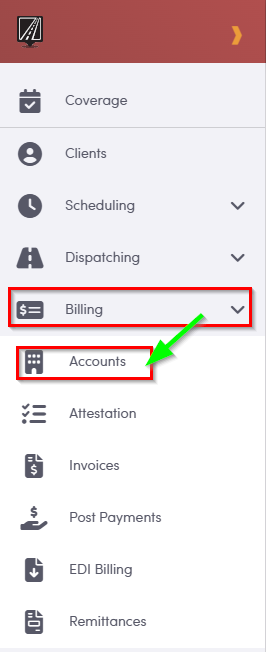
Navigate to the Billing , then select the Accounts .
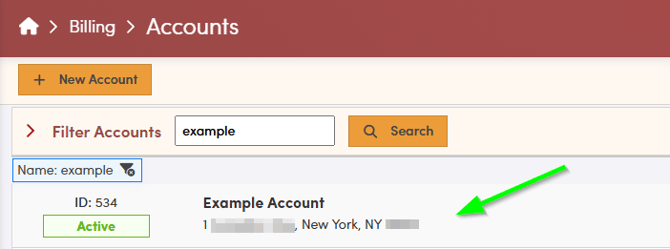
- Select the Account you would like to place on Credit Hold from the list.
- Click the Active/Inactive/Hold box and enter in a reason for the credit hold. This step is optional. Click Update Status.
- Click Update Account on the Account profile.
To View the Accounts on Credit Hold:
Navigate to the Reports tab, then select the Accounts on Credit Hold.
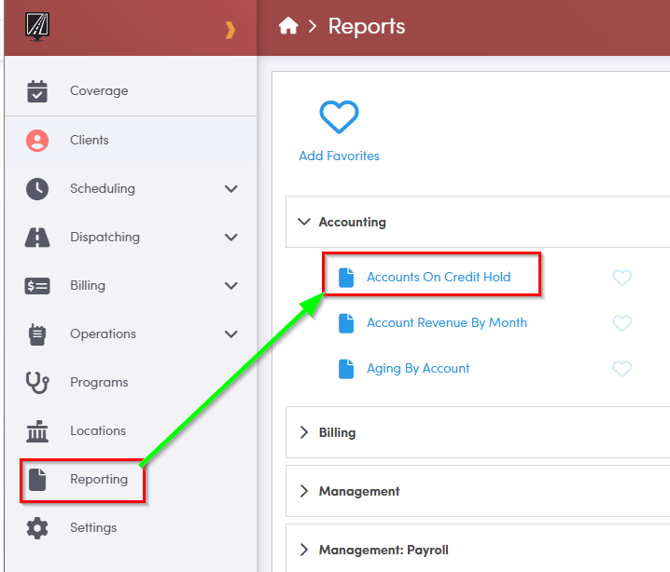
The report may take a moment to load.
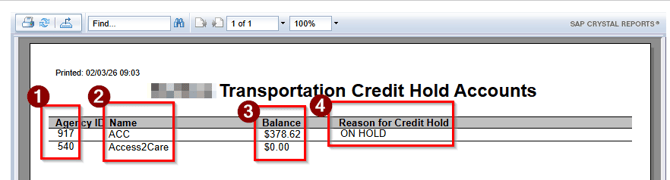
- The account ID will be displayed in the Agency column.
- The account name will be displayed in the Name column.
- If the account has an outstanding balance, the amount will be listed in the Balance column.
- The reason for credit hold will be noted in the Reason For Credit Hold column.
Key Terms:
Account, Balance, Credit Hold, Reports, ReportingFormHelp