![New Founders Software-White.png]](https://help.intelligentbits.com/hs-fs/hubfs/New%20Founders%20Software-White.png?height=50&name=New%20Founders%20Software-White.png)
Navigate to the Reporting tab, then select Billing.
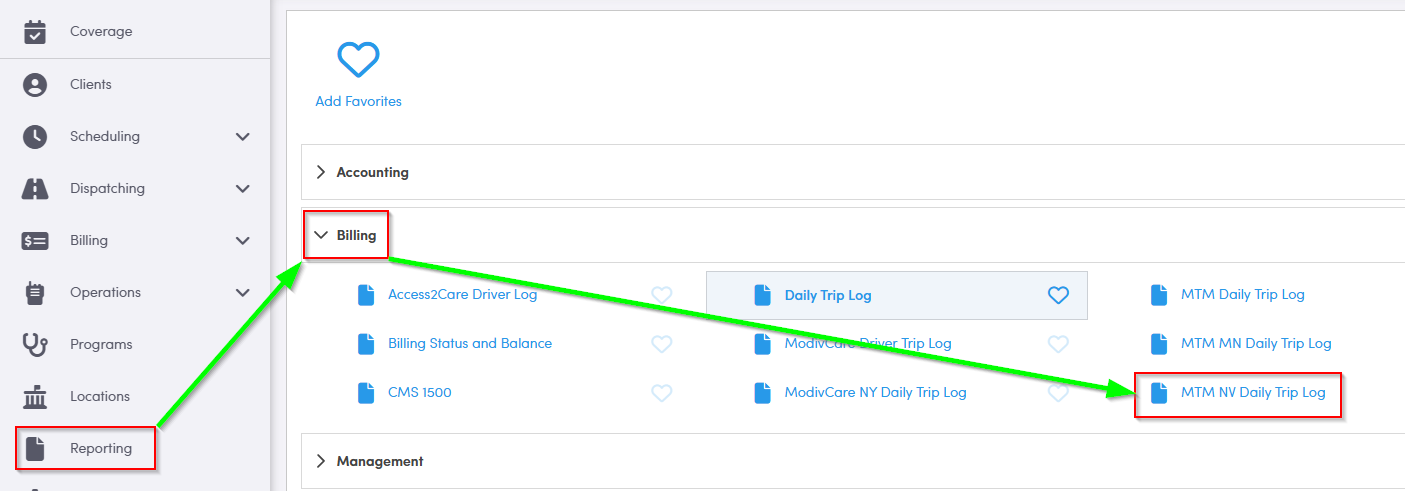
1. Double-click MTM NV Daily Trip Log.
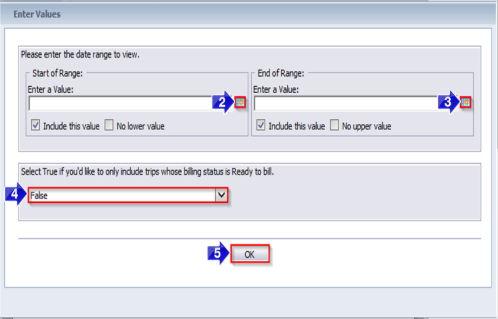
2. Click the calendar icon to select the beginning date.
3. Click the calendar icon to select the end date.
4. Select True if you would only like to view trips with a billing status of ready. By default, False is selected and trips with all billing statuses will populate on the report.
5. Click OK to generate the report.
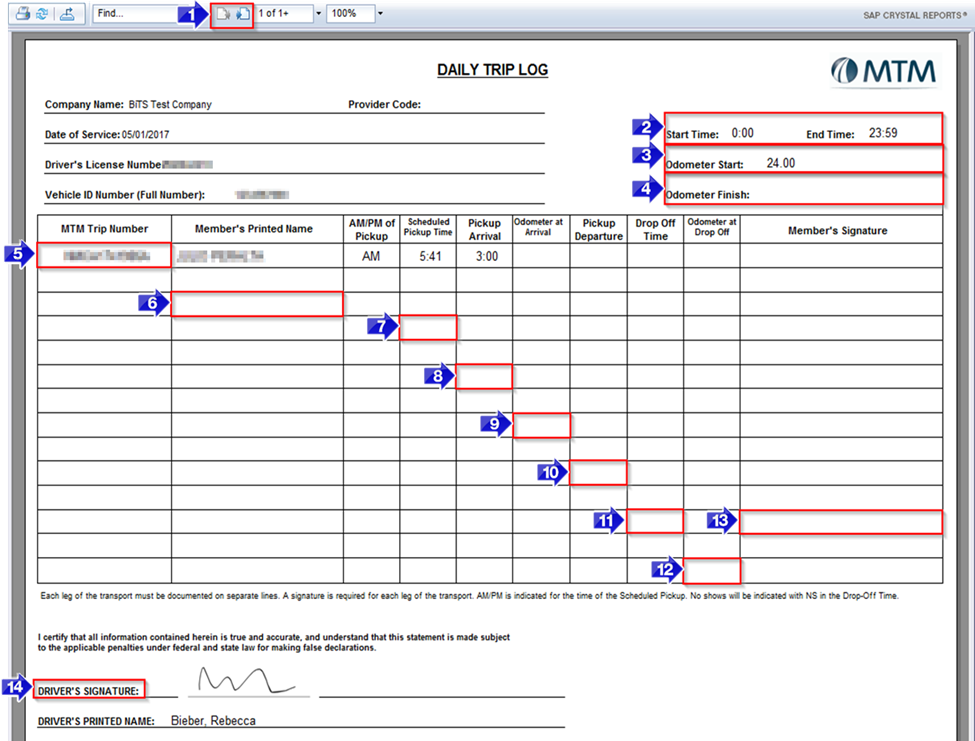
1. Use these buttons to toggle between pages.
2. The Start Time and End Time of the driver’s shift will appear here.
3. If your driver entered their odometer reading in the pre-checklist using RoutingBox Mobile, it will be displayed here.
4. If your driver entered their odometer reading in the post-checklist using RoutingBox Mobile, it will be displayed here.
5. The MTM trip ID will be displayed in the MTM Trip Number column.
6. The name of the client will be displayed in the Member’s Printed Name column.
7. The Scheduled Pickup Time will be displayed in this column.
8. If your driver updated their trip status using RoutingBox Mobile, the actual Pickup Arrival time will be displayed in this column.
9. If your driver entered an odometer reading when they arrived at pickup, it will be displayed in the Odometer at Arrival column.
10. If your driver updated their trip status using RoutingBox Mobile, the actual Pickup Departure time will be displayed in this column.
11. If your driver updated their trip status using RoutingBox Mobile, the actual Drop Off Time will be displayed in this column.
12. If your driver entered an odometer reading when they arrived at pickup, it will be displayed in the Odometer at Drop Off column.
13. If your driver collected the client’s signature using RoutingBox Mobile, it will populate the Member’s Signature column.
14. If your driver signed the pre-checklist using RoutingBox Mobile, it will populate in the Driver’s Signature field.
Key Terms: Billing, Billing Status, Client, Driver, License #, MTM, NV, Odometer, Provider, Ready, Report, VIN, ReportingFormHelp