![New Founders Software-White.png]](https://help.intelligentbits.com/hs-fs/hubfs/New%20Founders%20Software-White.png?height=50&name=New%20Founders%20Software-White.png)
Navigate to the Billing tab, then select the Reports icon.

1. Double-click Vehicle Usage.
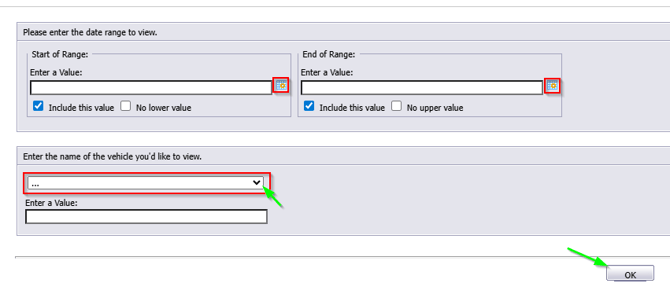 Click the calendar icon to select the beginning date.
Click the calendar icon to select the end date.
Choose which vehicle you would like to view the report for then select ok to run the report.
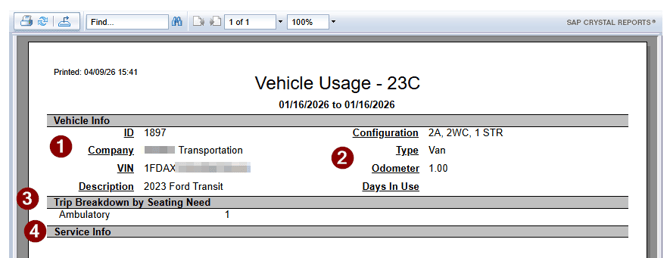
- Vehicle information: Will display the vehicle ID auto assigned by RoutingBox, Company name, VIN, and description input into RoutingBox when creating the vehicle record.
- Vehicle Information: Will display the configuration/type which is the capacity/capacity name assigned to the vehicle when the vehicle record was created, Odometer reading at the end of the time period and days the vehicle was used.
- Trip Breakdown by Seating Need: gives a value to how many of each type of seating need trip was completed.
- Service Info: If checklist is in place, anything marked a "NO" or defective during the time period will be noted.